
Prepared and reviewed by PET Group Payroll Operations · Updated 2 October 2026
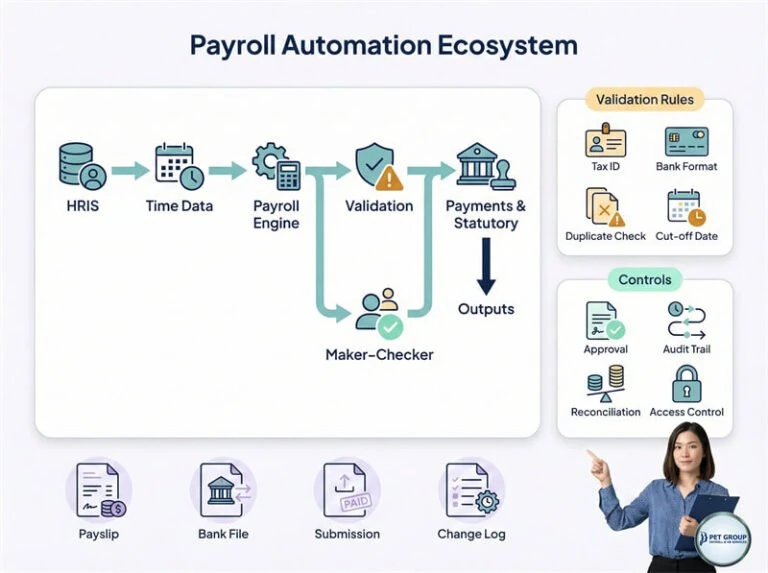
Payroll automation with review controls
Open full-size graphic ↗ (new tab; zoom to read)Read diagram in text
- HRIS and time data feed the payroll engine, followed by validation and payment or statutory outputs.
- Validation checks include tax identifiers, bank format, duplicates and cut-off dates.
- Maker–checker review, approval, audit trails, reconciliation and access controls support the process.
- Illustrated outputs include payslips, bank files, submissions and a change log. Connections and responsibilities depend on the agreed service scope.
Start with stable inputs
Standardise employee IDs, pay codes, date formats and approval status before connecting systems. Automating an inconsistent file simply moves its errors faster. Use validation to reject missing fields and duplicates, with a clear route for correction.
Keep people in the approval loop
Automated checks can highlight an unusual net-pay movement or an unexpected allowance. A reviewer still needs to establish whether the change is valid. Statistical or AI-generated flags are prompts for investigation, not proof that a salary is right or wrong.
Do not place identifiable employee payroll data into an unapproved AI service. Review the processing terms, access, retention and data-transfer arrangements before considering any such use.
Evaluate a proposed integration
- Which manual step will it replace, and which system owns the record?
- How are errors surfaced rather than silently ignored?
- Can a reviewer trace a result back to its approved input?
- What happens when an import is repeated or a system is unavailable?
- How are changes tested, versioned and rolled back?
Measure the result
Compare time spent rekeying, query volumes, rejected inputs and corrections after approval. Test with representative cases and retain a fallback process. A shorter processing time is only an improvement if the approved output remains accurate and explainable.
Automation capabilities depend on the agreed systems and scope. This guide does not imply that PET currently offers every AI or automated-payment feature discussed in the wider market.
Next: payroll data integration and data security checks.