
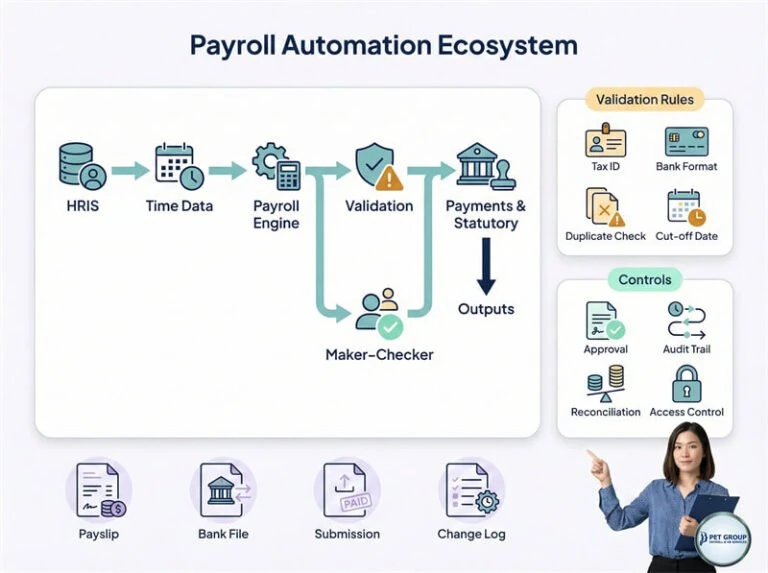
Payroll automation with review controls
Open full-size graphic ↗ (new tab; zoom to read)Read diagram in text
- HRIS and time data feed the payroll engine, followed by validation and payment or statutory outputs.
- Validation checks include tax identifiers, bank format, duplicates and cut-off dates.
- Maker–checker review, approval, audit trails, reconciliation and access controls support the process.
- Illustrated outputs include payslips, bank files, submissions and a change log. Connections and responsibilities depend on the agreed service scope.
Start with the source and destination
Identify which system owns employee details, attendance, leave and expense approvals. Then define the payroll inputs and the outputs required by Finance. Integration may use agreed import/export files; API or automated connections depend on the systems involved and need separate technical confirmation.
Avoid maintaining multiple independent versions of the employee master. Use a stable employee identifier and record the date each change takes effect.
What needs mapping
| Data | Checks to agree |
|---|---|
| Employee records | Unique IDs, employing entity, department, bank fields and effective dates. |
| Attendance and leave | Date range, units, approval status and duplicate records. |
| Pay items | Source code, payroll code, currency and applicable treatment. |
| Accounting | Ledger code, cost centre and balancing/reconciliation rules. |
| Output files | Required bank or system format, version and authorised recipient. |
Test the difficult cases
A trial should include a new joiner, a leaver, a salary change, unpaid leave, variable pay and a rejected or missing input. Check both employee-level results and overall totals. Record how the system handles invalid values rather than silently accepting them.
Approve the mapping before live use. When a file layout or pay-code definition changes, version the change and repeat the affected checks. Keep evidence of the expected result and the accepted result.
Prepare for a technical discussion
- Sample file layouts with synthetic or anonymised records.
- System names and the available export/import options.
- Pay-code definitions and required accounting outputs.
- Frequency, volume and the owner of each transfer.
- Access, transfer, retention and error-handling requirements.
Related employee tools: e-Attendance, e-Leave and e-Claims.